
So, I have two different GTA games installed on my PC. Two different folders as well. I installed SAMP in one of the folders which is the 0.3.7 version and then I installed the 0.3.8 version in the other folder, but when I click on the 0.3.7 version, it doesn't work. It automatically takes me to the 0.3.8 version of SAMP. Why is this happening and how to fix it? Thank you in advance.
Two GTA games and two SAMP
Started by TeodoraMk,
9 minutes ago, TeodoraMk said:So, I have two different GTA games installed on my PC. Two different folders as well. I installed SAMP in one of the folders which is the 0.3.7 version and then I installed the 0.3.8 version in the other folder, but when I click on the 0.3.7 version, it doesn't work. It automatically takes me to the 0.3.8 version of SAMP. Why is this happening and how to fix it? Thank you in advance.
Are you launching the SAMP executable directly from the 0.3.7 directory, or just from your operating system's start bar?
Directly from the directory.
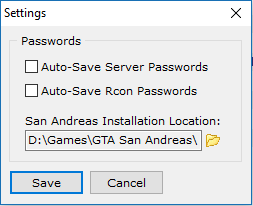
The client is launching the game executable (gta_sa.exe) from the directory stated on SA-MP Client > Tools > Settings > San Andreas Installation Location. This setting is linked to the registry (HKEY_CURRENT_USER/Software/SAMP), which is why the correct client version is not launching properly even if you have the game in separate directories, therefore you will have to change the game directory location from the client settings everytime you switch client versions. You can make this task easier by creating registry files for two-click version switching, however.
10 minutes ago, Giga said:The client is launching the game executable (gta_sa.exe) from the directory stated on SA-MP Client > Tools > Settings > San Andreas Installation Location. This setting is linked to the registry (HKEY_CURRENT_USER/Software/SAMP), which is why the correct client version is not launching properly even if you have the game in separate directories, therefore you will have to change the game directory location from the client settings everytime you switch client versions. You can make this task easier by creating registry files for two-click version switching, however.
giga to the rescue
SAMP will launch the last version you installed, no matter the directory. I've had the same problem aswell, easiest fix is uninstall the one you don't want to use (takes max 2 seconds) and then just launch whatever SAMP and locate the GTA you want to use which is max 2 seconds aswell. If you want to use the other SAMP again just install it again and directly use it, which takes max 5 seconds to install. This is how I do it. And you don't actually need to GTA directories for this, can use only one.
11 minutes ago, crimeson said:SAMP will launch the last version you installed, no matter the directory.
Not necessarily. The game directory can be easily changed in just less than 10 clicks. This is the SAMP client settings I am referring to, and the game will launch from that directory.
21 minutes ago, Giga said:Not necessarily. The game directory can be easily changed in just less than 10 clicks. This is the SAMP client settings I am referring to, and the game will launch from that directory.
Well, from my experience even if I tried to change the target GTA or w/e, it would still launch the same thingy if I didn't uninstall. I guess it's something on my end.
2 hours ago, Giga said:Not necessarily. The game directory can be easily changed in just less than 10 clicks. This is the SAMP client settings I am referring to, and the game will launch from that directory.
Is that a new operating system I see Giga? No more Windows XP?!